PlaceTap: Home-screen widgets for instant map directions
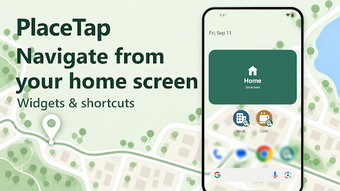
PlaceTap - Map & Nav Widgets, from choyoworks, puts frequent destinations on the Android home screen for one-tap routing. The app creates customizable widgets that launch Google Maps directions instantly, supporting driving and walking modes and folder organization. Widgets accept pasted share links or a saved current GPS fix, storing places locally without account sign-in. Commuters and repeat travelers gain quicker access to routine routes and temporary stops.
What PlaceTap does for daily navigation
PlaceTap converts saved locations into home-screen shortcuts that open Google Maps directions with a single tap, matching the app's stated one-tap navigation function. The workflow covers both permanent and temporary spots by accepting share links from map apps or saving the device's current GPS location, so users skip the search step when launching navigation.
How the app handles routing accuracy and modes
The app delegates turn-by-turn accuracy to Google Maps by launching it directly, and offers a per-widget choice between driving and walking modes to control routing type. Because saved places are stored locally on the device, the app does not transmit actual coordinates to an account service, which supports a privacy-centered usage model while relying on the map app for positional precision.
Device compatibility, setup, and customization options
PlaceTap provides customizable widgets for Android home screens and includes adjustable icons, labels, colors, transparency, and text or icon sizes to match the launcher. The app groups places into folders for organizational workflows and requires no registration or advertisements, so setup is limited to granting normal widget placement permissions and supplying locations by share link or live GPS save.
Practical choice for repeat-route users who value privacy
PlaceTap is a practical option for commuters and frequent travelers who need immediate access to recurring destinations, because it turns saved places into persistent home-screen shortcuts and stores them locally. Expect the app to perform best when used alongside Google Maps for routing; a useful tip is to save occasional travel spots via map share links before leaving so widgets open directly to the intended destination.